Security+ code audits
Run a Security+ audit on a GitHub branch, review findings by severity, and verify fixes after AppJet patches your code. Free accounts include three audits a month.
Security+ is AppJet’s security audit for the source code on a GitHub branch. Agents powered by frontier AI models trace how the application handles requests, permissions, and data. The report maps the application’s attack surface and gives you a file location and guidance for each vulnerability the agents find.
Start a full audit
- Open your GitHub repository in AppJet and switch to the branch you want to review.
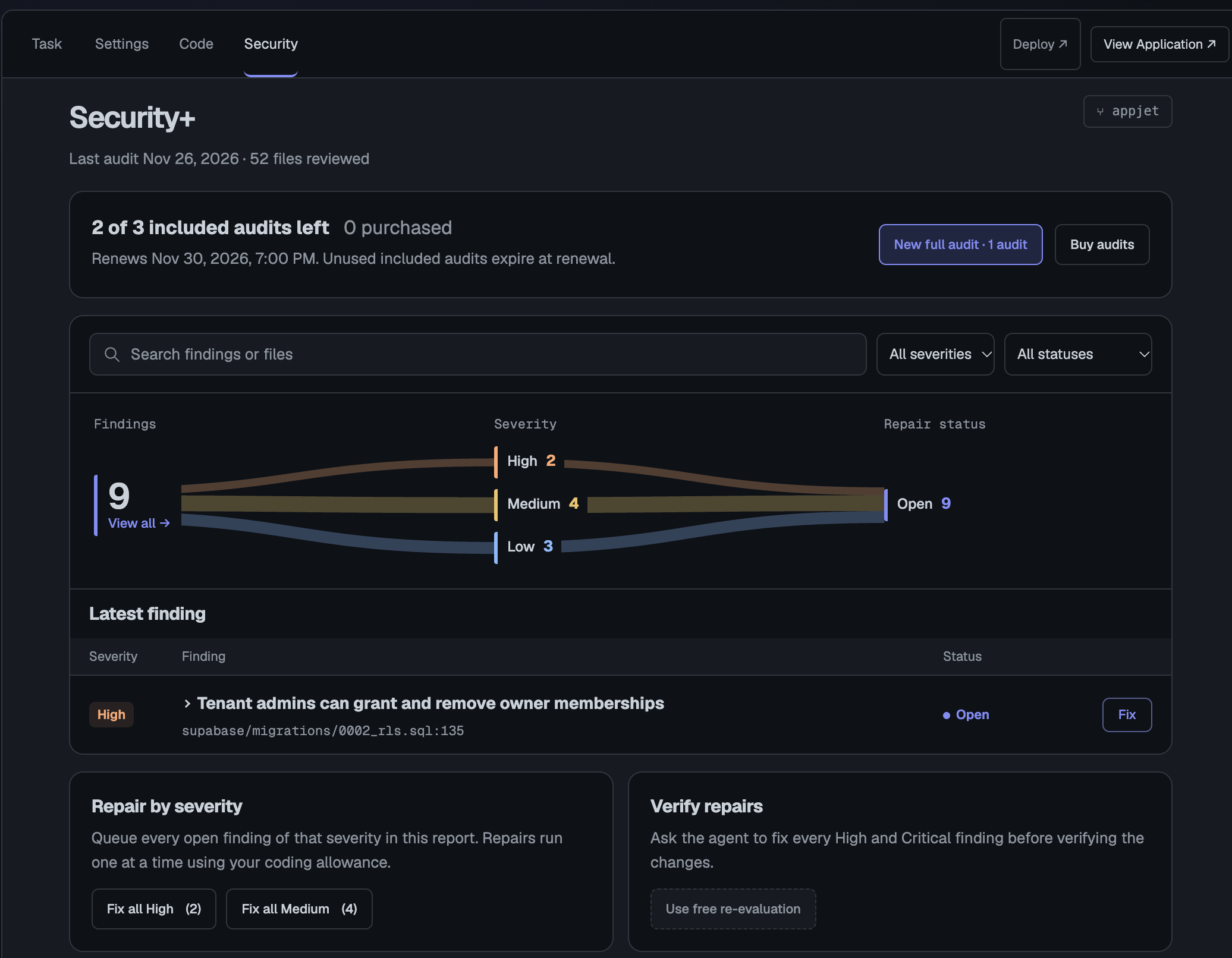
- Open the Security tab beside Code. Check the branch name in the upper-right corner and the audit balance below the Security+ heading.
- Select New full audit · 1 audit to start the review. When it finishes, open Security to read the report for that branch.
Read the findings
The report shows the audit date and how many files the agents reviewed. In the example below, the agents reviewed 52 files and reported nine open findings. Two are High severity, four are Medium, and three are Low.
Open the full-size dashboard screenshot.
Select View all to inspect the findings. Use Search findings or files to find a particular file or finding, or filter by severity and repair status. Expand a finding to read the details. The file path and line number point you to the affected code.
Fix findings and verify repairs
- Select Fix beside a finding to send it to the regular AppJet coding agent. To queue several repairs, use Repair by severity and choose a group, such as Fix all High. The agent works through the queue one finding at a time.
- Review the agent’s changes in your repository. Address all High and Critical findings before verifying repairs.
- After AppJet patches the code, select Use free re-evaluation under Verify repairs. Security+ checks the patched code against the original findings.
Check your audit balance
AppJet includes 3 full audits per month on Free, 5 on Starter, and 8 on Pro. The allowance is per account. You can split it across repositories or branches, or audit the same branch again as its code changes.
The Security tab shows your remaining included audits, purchased audits, and next renewal time. Unused included audits expire at renewal. Select Buy audits for an extra audit at $3.99 USD or a pack of 5, 10, or 25. See one-time audit prices.
What counts against my Security+ audit balance?
| Action | What it uses |
|---|---|
| Run a full source-code audit on a branch | One Security+ audit |
| Ask the regular AppJet coding agent to patch a finding | Your weekly coding allowance for the separate repair task |
| Re-evaluate findings after AppJet patches the code | One free re-evaluation included with each full audit |
| Automatically scan dependencies and the deployment image for known vulnerabilities at each build | Free on every plan. Uses no Security+ audits. |
For details about the automatic build checks, see dependency and container scanning. For the commitment behind the free audits, read AppJet’s Security+ launch announcement.